Remote controls
The remote control to the left is the remote control for the TV.
The remoe control to the right is the remote control for the Setup-Box.
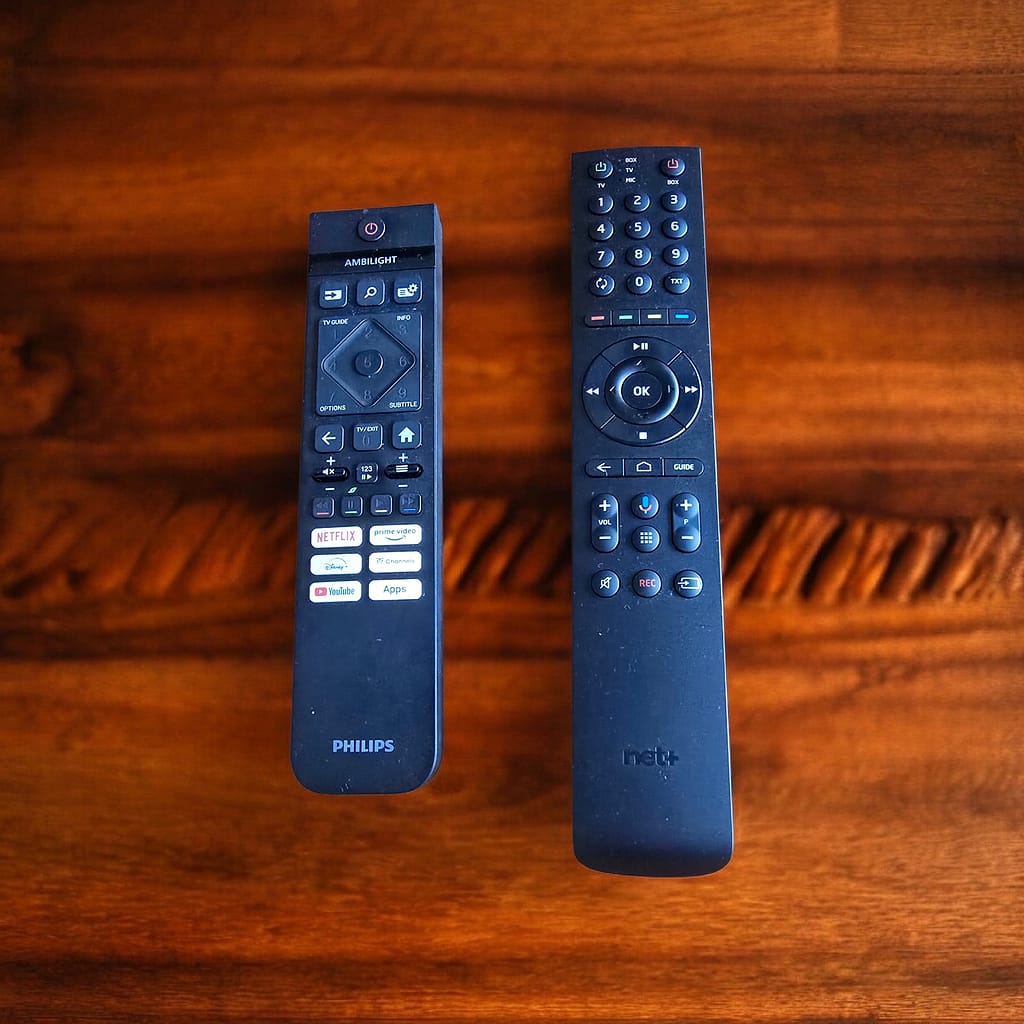
- Take the large remote control
- Press the red button in the upper right
- The TV and the Setup-Box are started and you are greeted with the home screen.
- Press the “Guide” on the remote control, to get o good overview of all the channels and their program.
- Take the smaller remote control
- Press the red button on the top to start the TV
- You are presented with the Home menu of the Smart-TV
- In the list of applications choose YouTube
- Either log in, with your own account, or skip the login and select “Continue as guest”
- Now you can search YouTube and watch what you want
- Take the small control
- Press the red button on the top to start the Smart-TV
- You are presented with the Home menu of the Smart-TV
- Choose the application “Casting” (the purple icon)
It will present you with the instructions… - Go to your mobile, which must be on the Wifi-Network of the appartment
- Go to the application from which you want to stream and look out for this icon:

- Click on the icon and then the content of your device is shown on the TV

Well, we do not provide Netflix, Disney or any other commercial streaming service. If you want to watch, you need to use your own account. To connect your own account is easy. Just scan the QR-Code that Netflix and others are providing, and follow the instructions.
Remember: It is your own responsability to remove the “device” from your account, once your stay is over. This is done quite easily. Go to your Netflix account and search for “devices”. Then select the device and choose “log out”.